Promises
- A promise has
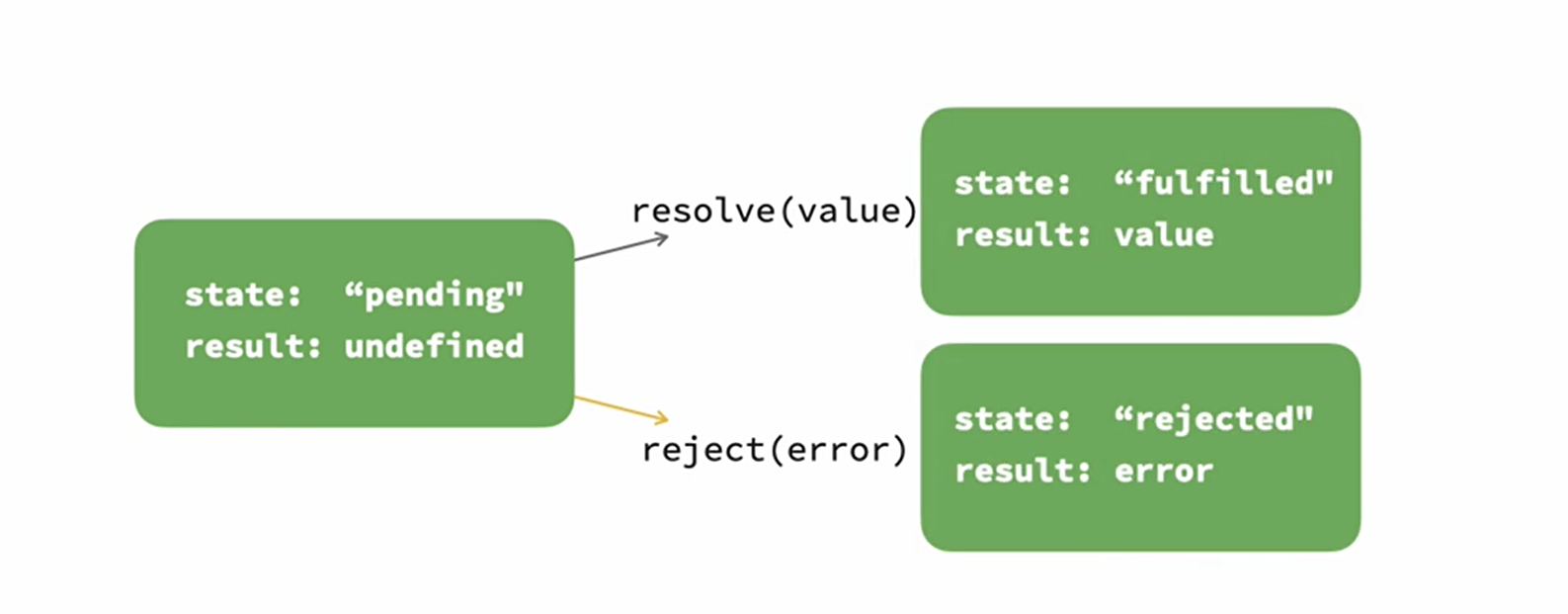
stateandresult state: It starts atpendingand can reachfulfilledorrejectedresult: It starts atundefinedand can be given a value based on operation- When Promise completes it executes either of the below functions:
- resolve(value)
state:fulfilledresult: value
- reject(error)
state:rejectedresult: error
Creating Promises
- We can create a Promise using Promise constructor
- We can use Promises with sync as well, but it is useful in async code
- The executor (callback) code is executed as soon as the Promise is created
let promise = new Promise(function(resolve, reject) {
    // do something
    if ( /* everything worked */ ) {
        resolve(result);
    } else {
        reject(error);
    }
});
Why Promises are not lazy
- https://stackoverflow.com/questions/49685779/why-do-promises-execute-at-the-point-of-declaration
- https://stackoverflow.com/questions/41004903/why-promises-are-designed-to-be-run-immediately-inside
- A promise is purely a notification mechanism
- https://developer.mozilla.org/en-US/docs/Web/JavaScript/Reference/Global_Objects/Promise
- Other languages might have “lazy” evaluation of operations, but promises executes as soon as they are created
- If you want to have “lazy” operation, then consider wrapping the promise in a function!!
// wrap promise expression in a function for lazy operation
const operation = () => promise_expression

// execute promise
const x = operation();

// it is also not like streams
// you can call then() multiple times and get the same data
x.then(data => console.log("hurray", data));
x.then(data => console.log("woaah", data));
Using Promises
promise
    .then(function(result) {
        // do something with result
        return(newResult)
    })
    .catch(function(error) {
        // deal with error
    })
    .finally(function() {
        // runs after promise is fulfilled or rejected
    });
Promise.prototype.then()
promise.then(onFulfilled[, onRejected]);

promise.then(value => {
  // fulfillment
}, reason => {
  // rejection
});
Parameters:
onFulfilled: AFunctioncalled if the Promise is fulfilled. This function has one argument, the fulfillment value. If it is not a function, it is internally replaced with an “Identity” function (it returns the received argument)onRejected: AFunctioncalled if the Promise is rejected. This function has one argument, the rejection reason. If it is not a function, it is internally replaced with a “Thrower” function (it throws an error it received as argument)
Return Value
- Once a Promise is
fulfilledorrejected, the respective handler function (onFulfilledoronRejected) will be called asynchronously. - Handler behaviours:
- returns a value, the promise returned by then gets resolved with the returned
valueas its value. - doesn’t return anything, the promise returned by then gets resolved with an
undefinedvalue. - throws an error (in synchronous code), the promise returned by then gets rejected with the thrown
erroras its value. - returns an already fulfilled promise, the promise returned by then gets fulfilled with that promise’s value as its value.
- returns an already rejected promise, the promise returned by then gets rejected with that promise’s value as its value.
- returns another pending promise object, the resolution/rejection of the promise returned by then will be subsequent to the resolution/rejection of the promise returned by the handler. Also, the resolved value of the promise returned by then will be the same as the resolved value of the promise returned by the handler.
- returns a value, the promise returned by then gets resolved with the returned
- In other words, a
then()call will return a rejected promise if- The function throws an error or
- returns a rejected Promise.
Promise.reject() // create a rejected promise
  .then(() => 99, () => 42) // onRejected returns 42 which is wrapped in a resolving Promise
  .then(solution => console.log('Resolved with ' + solution)); // Resolved with 42
Promise.prototype.catch()
The catch() method returns a Promise and deals with rejected cases only. It behaves the same as calling Promise.prototype.then(undefined, onRejected).
// Syntax
p.catch(onRejected);

p.catch(function(reason) {
   // rejection
});

var p1 = new Promise(function(resolve, reject) {
  resolve('Success');
});

p1.then(function(value) {
  console.log(value); // "Success!"
  throw new Error('oh, no!');
}).catch(function(e) {
  console.error(e.message); // "oh, no!"
}).then(function(){
  console.log('after a catch the chain is restored');
}, function () {
  console.log('Not fired due to the catch');
});
Gotchas in throwing errors
- If we throw error in synchronous code, then promise is rejected
- But if we throw error in asynchronous code, then the promise is not rejected
// Throwing an error will call the catch method most of the time
var p1 = new Promise(function(resolve, reject) {
  throw new Error('Uh-oh!');
});

p1.catch(function(e) {
  console.error(e); // "Uh-oh!"
});

// Errors thrown inside asynchronous functions will act like uncaught errors
var p2 = new Promise(function(resolve, reject) {
  setTimeout(function() {
    throw new Error('Uncaught Exception!');
  }, 1000);
});
Promise.prototype.finally()
- The
finally()method returns a Promise. When the promise is finally eitherfulfilledorrejected, the specified callback function is executed. This provides a way for code to be run whether the promise was fulfilled successfully, or instead rejected. - The
finally()passes the value (resolved or rejected) and return promise with that value - There is one exception that if
finally()throws error then it returns a rejected promise with the error instead of passing previous promise value finally()should not return anything and if anything is returned, it is silently ignored
// Syntax
p.finally(onFinally);

function checkMail() {
  return new Promise((resolve, reject) => {
    if (Math.random() > 0.5) {
      resolve("Mail has arrived");
    } else {
      reject(new Error("Failed to arrive"));
    }
  });
}

checkMail()
  .then((mail) => {
    console.log(mail);
	return mail;
  })
  .catch((err) => {
    console.error(err.message);
	throw new Error(`Second Throw: ${err.message}`);
  })
  .finally(() => {
    console.log("Experiment completed");
  })
  .then((mail) => {
	console.log(`Attempt 2: ${mail}`);
  })
  .catch((err) => {
	console.log(`Attempt 2: ${err.message}`);
  });

// Output
/**
Case 1: Resolved: then() -> finally() -> then()
Mail has arrived
Experiment completed
Attempt 2: Mail has arrived

Case 2: Rejected: catch() -> finally() -> catch()
Failed to arrive
Experiment completed
Attempt 2: Second Throw: Failed to arrive
*/
Attach handlers to settled promises
- If a promise is pending,
.then/catch/finallyhandlers wait for its outcome. - If a promise is settled (
resolvedorrejected) then handlers just run immediately
Unhandled promise rejection
- If a promise is rejected, the execution should jump to the closest rejection handler.
- If we don’t catch error in promise then a global error is generated
Promisification
- Converting callback based functions to a function that returns promise
// Assume the following callback based function:
// getSumAsync(num1: Number, num2: Number, callback: (err, result) => {...});
// Hence callback is error-first callback
const getSumAsync = (num1, num2, callback) => {
  if (!num1 || !num2) {
    return callback(new Error("Missing dependencies"), null);
  }

  const sum = num1 + num2;
  const message = `Sum is ${sum}`;
  return callback(null, sum, message);
};

function promisify(f) {
  return function (...args) {
    // args[] is an array which will store a list of inputs
    // we will assume the person will give one less input to this new function compared to callback based function
    // so getSumPromise(3, 6) with exactly 2 arguments instead of 3 with callback

    return new Promise((resolve, reject) => {
      // This is the callback we will pass to the function f
      function callback(err, result) {
        if (err) {
          reject(err);
        } else {
          resolve(result);
        }
      }

	  // To call original function we need to add callback to the list of args
	  // After this args will have 3 inputs which is suitable to call
	  // original function f
      args.push(callback);

      f.call(this, ...args); // call the original function
    });
  };
}

const getSumPromise = promisify(getSumAsync);
getSumPromise(3, 6).then((res) => console.log(res)); // 9
Promise static methods
Promise.all()
- If all promises
resolved: returns array of results - If one
rejects: fails fast and returns with first rejection message
- It takes an array of promises as an input, and returns a single Promise that resolves to an array of the results of the input promises. This returned promise will resolve when all of the input’s promises have
resolved, or if the input iterable contains no promises. It rejects immediately upon any of the input promises rejecting or non-promises throwing an error, and will reject with this first rejection message / error.
var p1 = new Promise((resolve, reject) => {
  setTimeout(() => resolve('one'), 1000);
});
var p2 = new Promise((resolve, reject) => {
  setTimeout(() => resolve('two'), 2000);
});
var p3 = new Promise((resolve, reject) => {
  reject(new Error('reject one'));
});
var p4 = new Promise((resolve, reject) => {
  reject(new Error('reject two'));
});


// Outputs: [ 'one', 'two' ]
Promise.all([p1, p2])
    .then(values => {
        console.log(values);
    })
    .catch(error => {
        console.error(error.message)
    });

// Outputs: reject one
// It could be "reject two" as well
Promise.all([p1, p2, p3, p4])
    .then(values => {
        console.log(values);
    })
    .catch(error => {
        console.error(error.message)
    });
Promise.allSettled()
- Settle all promises and get result irrespective of success/failure
- Returns a promise that resolves after all of the given promises have either
fulfilledorrejected, with an array of objects that each describes the outcome of each promise.
Promise.any()
- Returns a single promise that resolves as soon as any of the promises in the iterable is
fulfilled, with the value of the fulfilled promise - If all given promises reject, then returned promise is rejected as well
Promise.race()
- Returns a promise that is
fulfilledorrejectedas soon as one of the promises in an iterablefulfilledorrejected, with the value or reason from that promise.
Promise.resolve()
- Returns a promise which resolves with the input value
Promise.reject()
- Returns a promise which rejects with the input value
Promise polyfill
- They can be used to provide Promise functionality in older browsers.
- An example is
promise-polyfilllibrary - Note: Babel cannot transpile Promise to older versions.