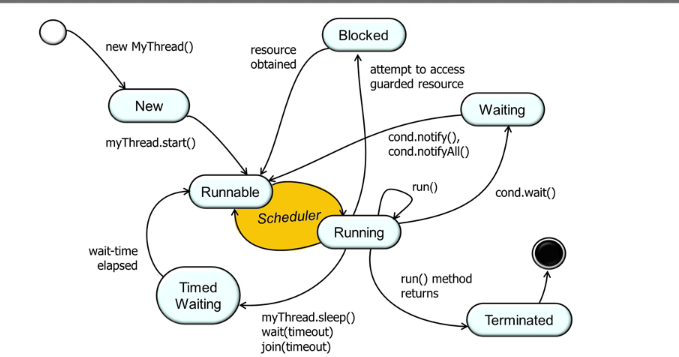
You need to override run() method and one way to remember is that start() is a special method which calls native method implementation and hence should not be overridden
Cons
You cannot extend any more classes since only one class can be extended in java
When we extend Thread class, each of our thread creates unique object and associate with it
While if we use Runnable, it shares the same object to multiple threads
public class ThreadExample extends Thread { @Override public void run() { int i = 1; while (i <= 100) { System.out.println(i + " " + this.getName()); i++; } }}
and running it in main():
ThreadExample thread1 = new ThreadExample();thread1.setName("First Thread");thread1.start(); // starts the run() methodThreadExample thread2 = new ThreadExample();thread2.setName("Second Thread");thread2.start(); // starts the run() method
Runnable + Thread Constructor
It is the preferred method
Runnable is a functional interface
Can be used as lambda
// taken from JDK 17@FunctionalInterfacepublic interface Runnable { public abstract void run();}
Creating Runnable:
Using implements
Using lambda
class RunnableExample implements Runnable { @Override public void run() { int i = 1; while (i <= 10) { System.out.println(i + " " + Thread.currentThread().getName()); i++; } }}public class Test { public static void main(String[] args) { // By implementing Runnable Thread thread1 = new Thread(new RunnableExample()); thread1.start(); // starts the run() method // By using lambda Thread thread2 = new Thread(() -> { int i = 1; while (i <= 10) { System.out.println(i + " " + Thread.currentThread().getName()); i++; } }); thread2.start(); // starts the run() method }}
Thread methods
Static:
currentThread() — return current Thread instance
activeCount() — live thread count in ThreadGroup
holdsLock(Obj obj)
sleep()
yield()
interrupted()
Actions:
join()
interrupt()
run()
start()
Info:
getState()
getName() / setName()
getPriority() / setPriority()
isAlive()
isDaemon() / setDaemon()
isInterrupted()
isVirtual()
threadId()
run() vs start()
You should always start thread using start() method
If you use run() then the thread will be executed in the current thread, which is no different than calling regular method
When you use start() method, internally it calls start0() method which is a native implementation which creates a new thread and calls run() internally
interrupt() vs stop()
deprecated: stop(), suspend(), resume()
Thread.yield()
A hint to the scheduler that the current thread is willing to yield its current use of a processor
Thread.sleep() causes current thread to suspend execution for a specified period
These sleep times are not guaranteed to be precise, because they are limited by the facilities provided by the underlying OS
Hence, you cannot assume that invoking sleep will suspend the thread for precisely the time period specified.
The sleep period can be terminated by interrupts, and method also throws checked exception for InterruptedException if it occurs
It puts current thread into TIMED_WAITING state
RUNNABLE -> TIMED_WAITING -> RUNNABLE
join()
t.join() causes the current thread to pause execution until t’s thread terminates
Like sleep(), join() responds to an interrupt by exiting with an InterruptedException
It puts current thread into WAITING/TIMED_WAITING until target thread terminates
Current Thread: RUNNABLE -> WAITING/TIMED_WAITING -> RUNNABLE
Target Thread: RUNNABLE -> TERMINATED
how is it different from using CountDownLatch to wait for threads to complete?
isAlive()
Tests if this thread is alive. A thread is alive if it has been started and has not yet died.
setDaemon()
Marks this thread as daemon
setDaemon() must be called before calling thread.start() else IllegalThreadStateException will be thrown
Daemon Thread and setDaemon()
It is specific to java
Non-Daemon threads are also called User threads or Normal Threads
When the JVM starts up, all the threads it creates are daemon threads except the main thread
A new thread by default inherits daemon status from parent
Execution
Think of it as the code is executing on the JVM, if all the non-daemon threads exits, JVM exits too
When all non-daemon threads finish, the JVM initiates an orderly shutdown, and any remaining daemon threads are abandoned
If we run non-daemon threads, then they all must exit themselves in order to exit the JVM, or otherwise JVM will not exit and it will be stuck forever
Hence, make sure if you make a daemon thread, then stopping it abruptly should not corrupt or cause any negative side effects
Never use daemon thread for I/O related tasks
Generally Daemon threads are used for background activities supporting non-daemon threads
Example daemon thread in JVM:
Garbage collector
Thread Priority
Range: 1-10
Internally Hardcoded MIN_PRIORITY = 1 and MAX_PRIORITY = 10)
Default: 5
Internal: NORM_PRIORITY = 5
CPU favors (not guarantees) to run higher priority thread to run first
setPriority() will throw IllegalArgumentException if new priority is outside the range
Avoid using thread priorities as they increase platform independence and can cause liveness problems
Most concurrent applications can use default priority for all threads
ThreadGroup
A thread group represents a set of threads. In addition, a thread group can also include other thread groups.
The thread groups form a tree in which every thread group except the initial thread group has a parent
A thread is allowed to access information about its own thread group, but not to access information about its thread group’s parent thread group or any other thread groups
Parent-Child Threads
Java does not have notion of parent and child thread