JVM
- Java Virtual Machine
- https://www.freecodecamp.org/news/jvm-tutorial-java-virtual-machine-architecture-explained-for-beginners/
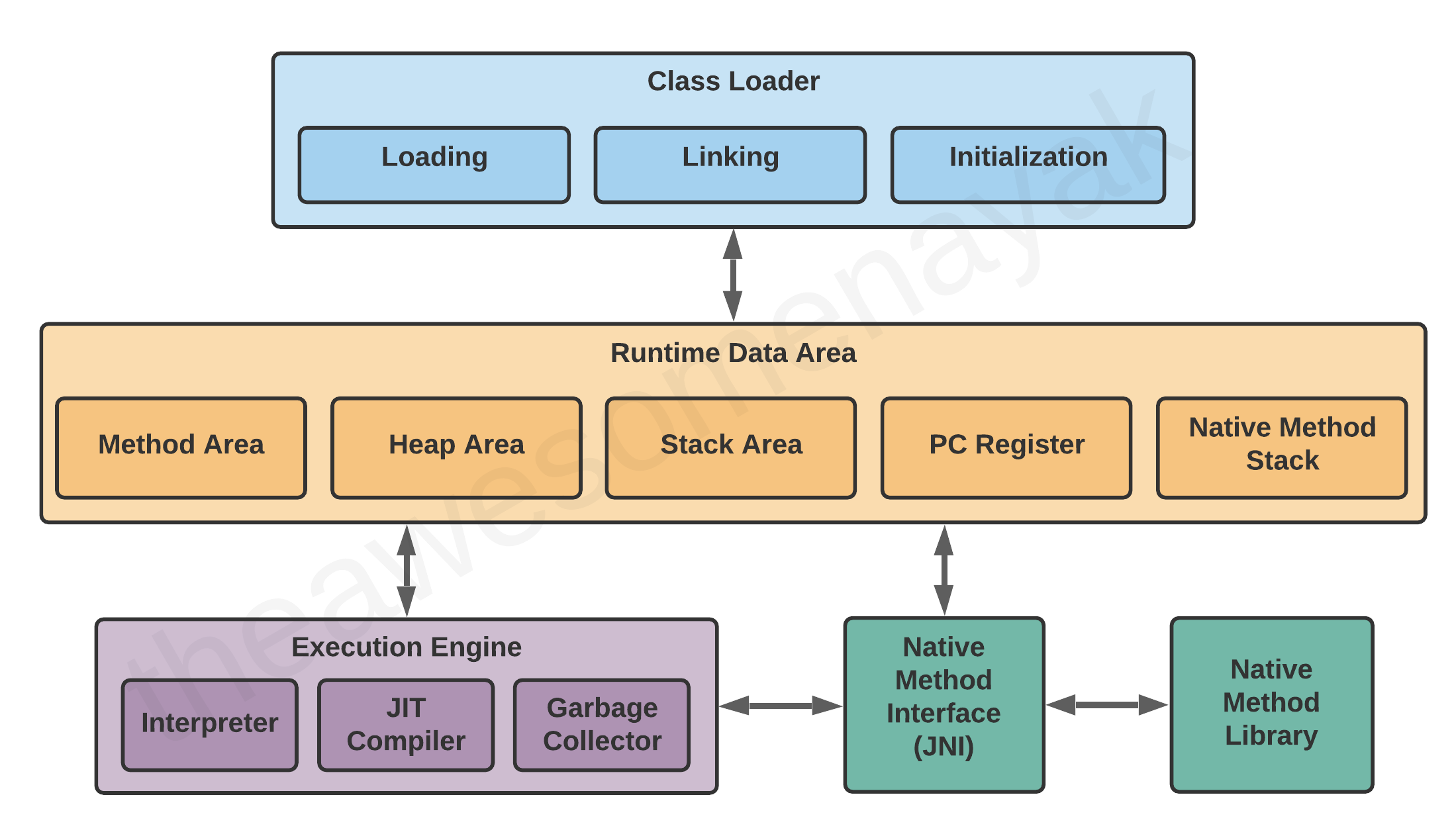
- Engine that runs bytecode and make java platform independent
- Components:
- Class loader: responsible for loading java class files into memory
- Execution engine: executes the java byte code. Its components are:
- Just In Time (JIT) compiler: compiles frequently executed byte code into optimized machine code
- Interpreter: executes non-compiled byte code
- Runtime Data Areas:
Method Area: compiled class filesHeap Area: objectsStack Area: local variables, results of intermediate operationsProgram counter (PC) register: address of the next instruction to be executedNative Method Stack: Helps in executing native methods
- JVM Components:
JRE
- Java Runtime Environment
- contains JVM + standard libraries:
java.langjava.util
JDK
- Java Development Kit
- contains JRE + Tools that are required to compile, debug, and run a program developed using the Java platform
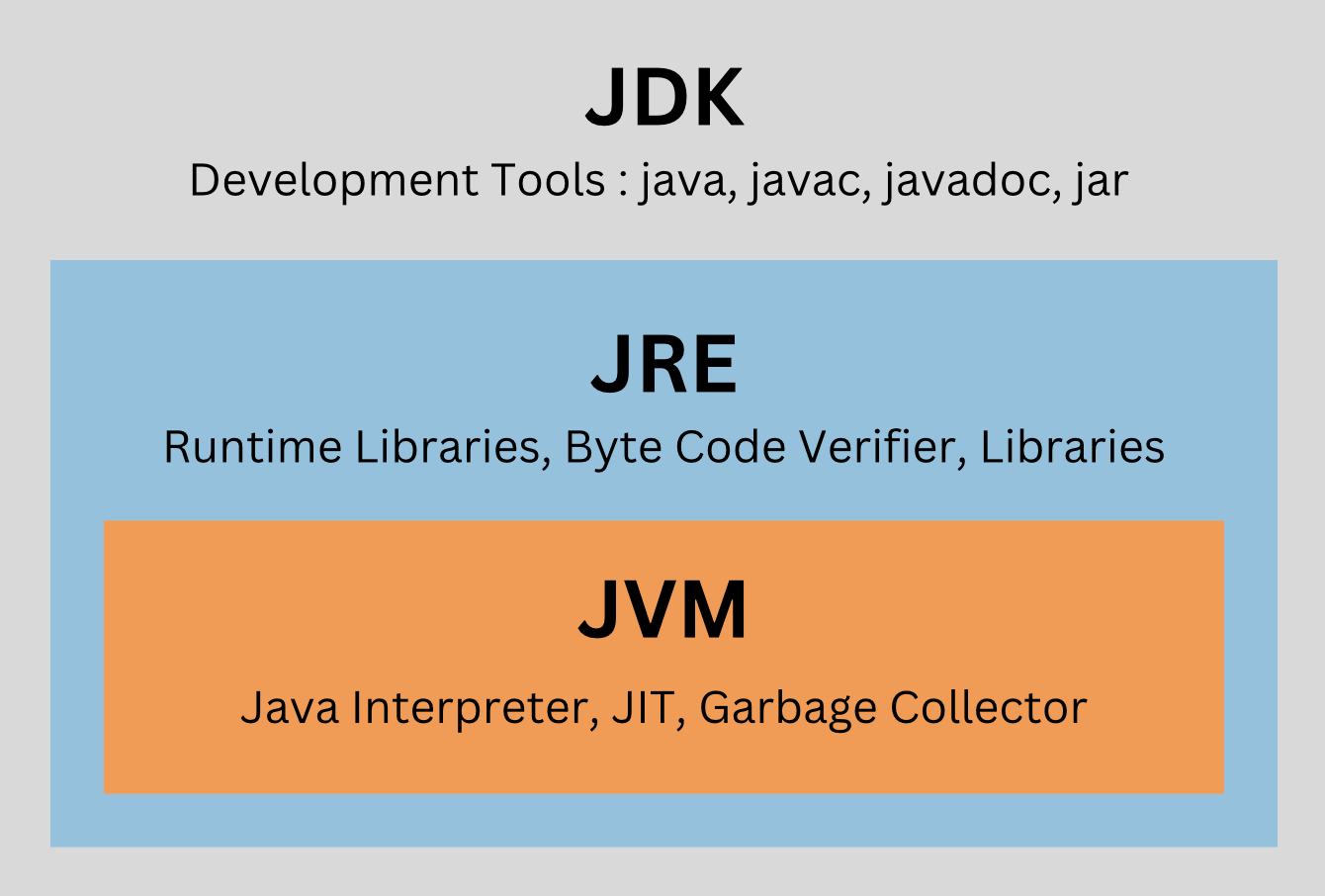
JDK vs JVM vs JRE
- JVM
- loads, verifies, runs Java bytecode
- converting bytecode to machine-specific code
- can also run other programming language Java bytecode.
- necessary in both JDK and JRE
- performs memory management and security
- JRE
- You can only run your java program
- include libraries like
java.langandjava.util - JDK
- Java Development Kit
- Superset of JRE
- platform specific
- contains:
- JRE
- compiler (
javac) - debugger (
jdb) - archiver (
jar) etc.
Interpreter
- reads and executes the bytecode instructions line by line
- it is comparatively slower since it reads instruction line by line
- when a method is called multiple times, every time a new interpretation is required
- Java is both compiled (via
javac) and interpreted (viajava) language
JIT
- Just in Time Compilation
- Execution Engine first uses the Interpreter to execute the byte code, but when it finds some repeated code, it uses the JIT compiler.
- JIT compiler compiles the entire bytecode and changes it to native machine code.
- This native machine code is used directly for repeated method calls
- compared to AOT compilation
- Ahead of Time compilation
- a JIT compiler compiles the program as it is running
- an AOT compiler compiles the program before it is running
- https://softwareengineering.stackexchange.com/questions/246094/understanding-the-differences-traditional-interpreter-jit-compiler-jit-interp
JNI
- Java Native Interface
- programming framework that acts as a bridge for permitting the supporting packages for other programming languages such as C, C++, and so on.
nativekeyword to indicate that the method implementation will be provided by a native library.- Native Method Libraries:
- written in other languages
- generally
*.soor*.dllfiles - Can be loaded by JNI
GC
- Garbage Collector
- See stack_heap_and_garbage_collection
JVM based languages
- Scala
- Kotlin (official language of Android Development)
- Groovy (Gradle build scripts uses groovy DSL language)
- Clojure
Heap
Java command line
javac
- Compile java code
- Outputs class files
javac Test.java

# include external jars in classpath
javac -cp <class-path-for-external-jars> Test.java

# output to a directory
javac -d <directory-path> Test.java
java
- Runs the class files
# do not use extension .class
java Test

# for external jars
java -cp <class-path-for-external-jars> Test.java
javap
- Standard Java Disassembler
- Disassembles a class file
- To make a
.classfile readable for humans, you should disassemble it
# do not use extension .class
javap -p Test
Environment variables
JAVA_HOME:- point to JDK folder
$JAVA_HOME/binshould exist having java executable
JAVA_OPTS:- java options
- example:
-Xmx2G -Xms512M
CLASSPATH:- example:
# WINDOWS, separate by semi-colon
$ set CLASSPATH=C:\dependency\framework.jar;C:\location\otherFramework.jar
$ set CLASSPATH=C:\dependency\framework.jar;C:\location\*.jar

# Linux/Unix, separate by colon
$ export CLASSPATH=/dependency/framework.jar:/location/otherFramework.jar
$ export CLASSPATH=/dependency/framework.jar:/location/*.jar
ClassPath
- Using classpath you can specify the java compiler where to look for user defined classes and packages.
- Ways to set classpath:
- Command line
-cpor-classpath - Environment variable:
$CLASSPATHor%CLASSPATH%
- Command line
Class Loader and Types
- It is part of JRE which dynamically loads Java classes into the JVM
- Usually classes are loaded on demand, JVM will only load class required for execution
- The on-demand approach means that the class will be loaded on its first invocation/reference
- 3 Built in class loaders
- Bootstrap/Primordial Class Loader
- loads JDK internal classes
- loads core classes and
rt.jar(removed in java 9 and merged with other libraries) - for example
java.lang.*package classes
- Extensions Class Loader
- loads classes from the JDK extensions directory
- usually
$JAVA_HOME/lib/extdirectory - extension of standard java core classes
- System Class Loader
- loads classes from the current classpath
- See ClassPath
- Bootstrap/Primordial Class Loader
- Custom Class loaders are required when:
- need to load class from FTP server
- need to load from third party web service
- need to load class at runtime
- Delegation Model
- When the JVM encounters a request to load a class, it first checks if the class has already been loaded.
- If not, it delegates the request to a parent class loader. If the parent class loader returns nothing, it then attempts to find the class in its own classpath
- If class is not loaded then system delegates to extension which delegates to Bootstrap
- If Bootstrap does not find, Extension attempts
- If Extension does not find, then it goes back to system to attempt
flowchart BT

bootstrap["Bootstrap"]
extension["Extension"]
system["System"]

extension --> bootstrap;
system --> extension
// Application
System.out.println(MyClassLoader.class.getClassLoader());

// Extension
System.out.println(DriverManager.class.getClassLoader());

// Bootstrap (prints null)
System.out.println(java.util.ArrayList.class.getClassLoader());

/* Output
jdk.internal.loader.ClassLoaders$AppClassLoader@73d16e93 jdk.internal.loader.ClassLoaders$PlatformClassLoader@1fb700ee
null
*/
JAR files
- Java Archive
- In order for it to be runnable, we need to specify the Main class in Manifest
- Inside jar, there must be
/META-INF/MANIFEST.MFfile, which should specify the main class - !important to have a newline at the end, otherwise it will not work
Manifest-version: 1.0
Main-Class: Test
- Creating jar file
jar cfm test.jar META-INF/MANIFEST.MF Test.class- Running jar file
java -jar test.jarBytecode
- Intermediate representation of a Java program after the source code compilation
- stored in
.classfiles - Bytecode instruction:
- one-byte operation code: opcode
- zero or more operands
- Runtime bytecode generation refers to the dynamic creation and execution of code within a running program
- Uses of Runtime bytecode generation:
- Java’s Dynamic Proxy API
- Mockito utilize bytecode generation to dynamically create proxy (mock) objects
- Apache Spark creates custom functions and expressions for distributed data processing
- Libraries to generate/write/modify bytecode instructions
- ASM
- cglib
- Javassist
- ByteBuddy (better and easier to use)