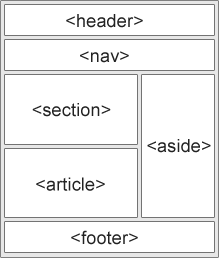
provide structure to web content and used to categorize and group content on a web page for better accessibility (for example keyboard-navigable for screen reader users) and SEO
<header>
<nav>
<main>
<aside>
<form>
<footer>
<section>
Non-semantic elements
<div>
<span>
<header>
Container for introductory content or a set of navigational links
Typically contains:
one or more heading elements
logo or icon
authorship information
<section>
A section is a thematic grouping of content, typically with a heading
A web page could normally be split into sections for introduction, content, and contact information.
Used for:
Chapters
Introduction
News items
Contact information
<section><h1>WWF</h1><p>The World Wide Fund for Nature (WWF) is an international organization working on issues regarding the conservation, research and restoration of the environment, formerly named the World Wildlife Fund. WWF was founded in 1961.</p></section><section><h1>WWF's Panda symbol</h1><p>The Panda has become the symbol of WWF. The well-known panda logo of WWF originated from a panda named Chi Chi that was transferred from the Beijing Zoo to the London Zoo in the same year of the establishment of WWF.</p> </section>
<article>
Specifies independent, self-contained content.
An article should make sense on its own, and it should be possible to distribute it independently from the rest of the web site.
You can have section inside article and vice versa, so no nesting relationship exists
<article>
<h2>Google Chrome</h2>
<p>Google Chrome is a web browser developed by Google, released in 2008. Chrome is the world's most popular web browser today!</p>
</article>
<aside>
Defines some content aside from the content it is placed in
<p>My family and I visited The Epcot center this summer. The weather was nice, and Epcot was amazing! I had a great summer together with my family!</p>

<aside>
<h4>Epcot Center</h4>
<p>Epcot is a theme park at Walt Disney World Resort featuring exciting attractions</p>
</aside>