Inheritance

  • Some properties are inherited and some are not
  • Examples (not inherited):
    • positioning related
    • layout related
    • decorative (border, background, images etc.)
  • Examples (inherited):
    • mostly text- prefix
    • mostly font- prefix

Cascading

  • The cascade is an algorithm that defines how user agents combine property values originating from different sources
  • The cascade defines the origin and layer that takes precedence when declarations in more than one origin, cascade layer, or @scope block set a value for a property on an element
  • CSS declarations come from different origin types:
    • User Agent Stylesheet
    • Author Stylesheet (added by developer)
    • User Stylesheet
      • added by user, chrome does not allow, and it is being phased out
      • extensions can still do it
  • Cascading algorithm:
    • find all the CSS rules applying for a given element
    • sort rules based on Origin (and other parameters like !important, cascade layer etc.)
      • In general: User Agent > User > Author
    • If same origin, Specificity of rules are considered
    • If same specificity, Scoping Proximity is calculated
    • If same Scoping Proximity, Last declaration of rule is considered
  • https://developer.mozilla.org/en-US/docs/Web/CSS/Cascade

Specificity

  • Specificity is an algorithm which determines which CSS selector is the most specific, using a weighting or scoring system to make those calculations.

Specificity Precedence rules

  • Most specific rule wins
span {}
ul li span {} /** wins **/
  • Specificity: #id > .class > tag
  • inline css (aka element.style) is more specific than css file
  • !important takes precedence over all
  • If the two rules are of same precedence and applies to same element then whichever rule comes last will win
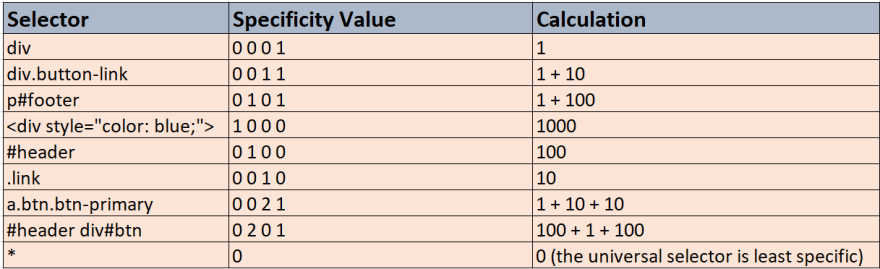
  • Below is the specificity calculation:
  • {If inline}-{# of ids}-{# of classes}-{# of elements/tags} css-specificity-calculation
  • Any style setting takes precedence over attribute value:
<!-- 500 will be used instead of 100 -->
<img width="100" style="width:500" >

User Agent Stylesheet

  • This stylesheet is used by browser to get the default value for properties not described